My Top Ten Droid Applications

1 01 2010

This is a list of the applications I have found most useful on the Motorola Droid. I will update this post as I discover apps that are worthy, and demote an item to make room. Some of the apps come on Droid out-of-the-box, others are available on the Android Marketplace. Here’s a quick flavor of what  will describe in more detail.

  • Turn by Turn Navigation.
  • Multi-touch ‘pinch’ zoom just like the iPhone. Plus tabbed browsing!
  • Print web pages and photos from your cell phone directly to your printer(s) from anywhere.
  • Make cheap international calls on your cell, bypassing Verizon’s higher rates.
  • Play Audible eBooks and magazines/newspapers.
  • Have the phone go into silent mode as you arrive at church and go back to normal after you leave.
  • Lose weight.
  • Turn you phone into a radio by playing internet radio on your home or car audio system, or on ear buds as you work out. No DJ’s, No audible adverts. Just music.
  • Have your MP3 collection with you wherever you go, even if it exceeds the memory capacity of the Droid. Take 100GB of search-able MP3’s (or more) on the road!!
  • Sync you iTunes library with the Droid!

1. Pandora (Free with ads or $34 without ads). Comes with the Droid.
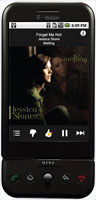
Pandora is a really well written internet radio application. One can select a music stream from a list of genres or type in an artists name and create your own feed of your favorite music. One can’t choose which songs are played, but each Pandora user can give an online thumbs up or thumbs down to a track that is being played which will help Pandora provide music that is well thought of in each genre or for each artist.

The ads are very small at the bottom of the screen, better still there are NO audio ads to interrupt the music, so it is much better than traditional broadcast radio. No DJ to tolerate either. If your phone rings, the audio stream is automatically paused and will resume after the call ends. Attach the audio out jack on the Droid to a stereo or car audio system and the music is CD quality.

I found that it works just as well on Verizon’s 3G network or on WiFi. If the phone switches between WiFi and 3G, say as you drive off from home, it switches seamlessly without skipping!! A click is sometimes heard, but that’s it.

The free version is limited to 40 hours of listening per month. There are also limits on how many tracks one can ‘skip’. These limits are either raised or eliminated if you subscribe to Pandora One. Read the rest of this entry »



Transfer Contacts from Blackberry to Droid

31 12 2009

The easiest way to transfer contacts from a blackberry to a Motorola Droid phone is via the GMail contact import feature using a CSV file exported from the Blackberry Desktop Manager. There is one gotcha though; Google does not give you a preview of how the contact data will map, which can have undesirable results!!

Here is the procedure.

  1. Backup your Blackberry data using the BB Desktop Manager.
  2. Export BB contacts to an Excel compatible CSV File. Follow the procedure found here.
  3. Open CSV file in Excel. Read the rest of this entry »


How Accurate is Google Latitude?

10 12 2009

Google latitude is a service Google offer to its mobile Google Maps customers. Latitude is able to optionally transmit and/or track a cell phones(and hence the owners) location.

It’s accuracy depends directly on how accurate the phones location tracking is. Some phones have fairly accurate GPS systems allowing for turn by turn applications, others are ‘approximations’ based upon triangulation of the adjacent cell phone towers. Nothing surprising or earth shattering here, however I was interested how far off the triangulation location is on the Blackberry 8830.  Even if you have very accurate GPS, how much can you depend on the present location of contacts you share location data with?

If your contacts don’t have accurate GPS on their phones, their location is very approximate. In addition to preciseness of GPS functionality of the phone itself, Google Maps/Latitude drops into low precision mode when you are running it as a background application. See here. So even if you do have great GPS,  results may not be that accurate.

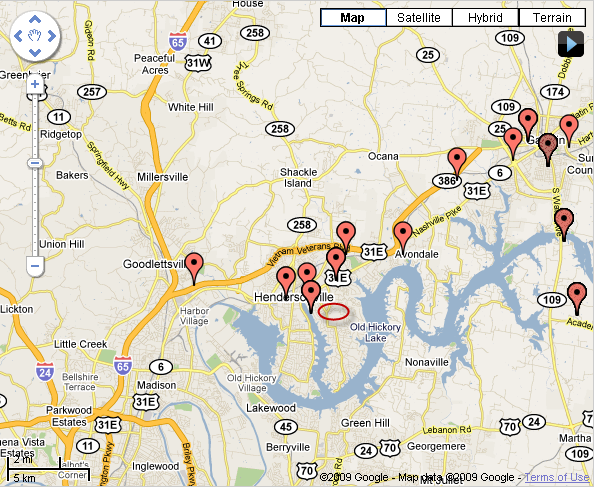
Density of cell towers where you are located appears to have the greatest impact on accuracy if your phone uses triangulation. At home it is accurate within 1/2 mile most of the time. At work near the airport at  Gallatin TN, I found it can be off by as much as 10 Miles!! Latitude History maps are shown below.

Poor accuracy when in low density cell tower zone

Reasonable accuracy with a higher density of cell towers

In the map on the left I was stationary for several hours at a location with a poor signal. The map on the right has a tighter cluster of points close to my home and the route to work, where I had a stronger signal and was closer to more cell towers. Google’s website indicates that it will typically default to the local cell tower location when you run it as  a background application. If that were true I’d expect a  cluster of points at the same spot while I was present at work and not that mobile. Clearly that did not happen.

Latitude will be of more value when all cell phones have true GPS. That day hopefully is not too far away. My next phone from Verizon maybe the Droid, I’d hope it to be more accurate than the 2+ year old Blackberry 8830 I currently have.

Update:2010-01-23 – I got the Droid.

On the Motorola Droid the GPS while Google Maps is running in foreground is wonderfully accurate, and even has the ability for a digital compass pointer. The problem comes when it runs in background, as I described earlier Google Maps drops into low precision mode, so I found my location could be off by several miles. No better than the Blackberry 8830 without GPS. The features on the Droid are superior however. Better map resolution, better traffic data, more map layers. I found the GPS Status App for the droid to be a nice app for troubleshooting GPS issues and it doubles as a compass and altimeter. The droid is accurate to 6 feet according to the GPS Status app.