New Kindle Owner – Week 1

19 09 2010

I placed my order for the latest Kindle 3 with Wifi + 3g on September 3rd 2010 and it arrived a few weeks later on September 16th. I’ve used it for a few days now and here are my first impressions :-

The Unexpected

Being sold out and on back order I resigned myself to having to wait 2 weeks to get the device before I could use it. However as I read up on the Kindle I quickly discovered you don’t actually need a Kindle at all to read Kindle books. Amazon have released Kindle applications for computers and smart phones. Visit this web page for more details.

I was able to install the Kindle app on my Android phone and start downloading and reading Kindle books immediately.  You don’t need to have ordered a Kindle to do this, the software is freely available.

I read HG Wells War of the Worlds. I had seen the TV reenactment of the famous radio version of this story. The book however was both different and delightful. Quite a satisfying read. I was amazed how readable the book was on an Android phone. I had read the entire book while waiting on the Kindle to arrive in the mail. I found the ‘Sepia’ theme to be the easiest on the eyes. I also experimented with the Desktop application on both Windows XP and Windows 7. It worked great and synchronized my reading place between devices across the internet. Amazon refer to this sync feature as WhisperSync. It works remarkably well.

I also discovered that many classic books are free, and some books are offered for free on short term promotions. Many books offer the first chapter for free.

By the end of the first week I had purchased 17 books. 15 free, 2 paid for, for a grand total of $10. I had registered 2 mobile devices and 4 computers to my Amazon account in addition to the yet to be received Kindle.

The Good

The Kindle arrived and I found the reading experience to be much better than anticipated, even given the positive reviews I had already read on the web. The text is very sharp thanks to great contrast. This is my first time to experience ‘e-ink’ and it is quite phenomenal. In bright light I find the readability to be superior to physical books.

Not only were all my purchases available directly upon opening of the box, but all my Audible titles were also available for download. The automatic synchronization between my Kindle and Audible accounts was seamless and the audio books sound great on the Kindle. I was able to pick up reading Stieg Larssons, ‘The Girl with the Dragon Tattoo’ where I had left off on my android device.

Free 3g wireless for the life of the service/device. What a deal!! No contracts, no fees just download content from anywhere with 3g data. It even works with Edge if 3g isn’t available.

The Bad

The price of e-books. You’ll notice I ‘purchased’ a lot of books at no cost, this sounds great, what can I complain about? The reason I selected free books is that current books are in my opinion over priced, as a rule of thumb, e-books are priced the same as paperbacks, or a smidgen less. Don’t blame Amazon, they wanted to price most e-books at $9.99 or less, but the publishers lead by Macmillan were successful in strong arming Amazon into charging more. Read more here . It is dismaying to see Apple at the center of the price hike as a result introducing the iPad earlier this year. More competition leads to higher prices!?! Am I missing something? I refer to higher e-Book prices that is, thanks to Apple the Kindle price is cut in half, hence my purchase :-)

Click to enlarge image

Amazon advertise the latest Kindle as having 4GB of storage. Well actually its more like 3GB usable storage. I’m accustomed to GB inflation from hard drive manufacturers, but 25% difference? Hmmm….

The Ugly

‘Experimental Features’ such as the MP3 player and Web Browser are not easy to use on the Kindle. The MP3 player is simply a jukebox that plays your MP3’s in the order they were loaded on the device. No controls.

The Web Browser is slow and very difficult to use without a pointing device. Using up/down/right/left arrows to navigate is very frustrating. One good note however, the browser scores 100 on the acid3 browser test and renders sites such as Gmail very well. Why offer a browser at all? To sell books of course.

Summary

I like it. I like it a lot. I recommend you get one even if you already have a laptop/notebook/iPad. This dedicated reading device is very compelling.




Official Audible App for Android – Beta now available!

5 06 2010

Audible have been slow to support Android devices, not sure why but the wait is over. Google and Audible have teamed up and there is now an official beta app available that works with your Audible account/library. To get it visit the Audible for Android (Beta) group at Google Groups.  At the time of writing (June 5th 2010) there are 3231 members of this group, so there are not many folks out there aware of this beta application. Hopefully I can spread the word via this blog :-)

Installation

The download is not available on the Android market so you need to setup your phone to allow downloads from ‘unknown sources’. To do so enter the settings on your android phone, select applications and check ‘Unknown Sources’. Now visit the download page on a desktop PC scan the QR code using your android device. Once the download is complete click on the .apk file and follow the installation prompts.

How Good is It?

I have found the beta to be stable on the Motorola Droid (Version 0.136b). As soon as you authenticate the application to your Audible account it updates the items you have in your Audible library, presents them in a list that can be sorted several useful ways and allows one to select the items for download.

One ‘drawback’ of this application is that it can only download and play Audible’s enhanced audio format. This means the downloads are quite big, 28MB per hour of audio. Not all titles are available in the enhanced format, out of my library of 24 titles, 2 are not available in enhanced audio format, so I can’t play them using this android app. This level of audio fidelity is wasted on a mobile device one will use while exercising, driving the car etc. As a result it is best to download the files while attached to a WiFi network for speed and to ensure you don’t hit any download caps your provider may have set. This means you really need to download files prior to heading out the door. In the discussion forum the developers have mentioned they will support lower fidelity file types in the future. The only way to download enhanced audio format using the app is to first ensure that your audible media is setup as enhanced using your account on the web, you can’t change format via the phone.

If you already have the enhanced audio files downloaded to your PC/Mac it is possible to simply copy the .aax files to the Audible folder on your android phone and the application will automatically detect them when it is launched. The application gives one a simple way to remove old audio files from your phone to free up space, long hold the title and chose remove.

The application fully supports chapters and bookmarks as with other audible players on other devices and on your desktop. One feature that appears to b missing is the ability for it to synchronize the place in any audio file to allow one to pick-up where you left off if you resume on another device. This feature is present with some supported audible devices, so this is a disappointment.

At this time it is not possible to search for or add books to your library via the app, you have to visit the website to do that, after which one can refresh your library on the phone and download the ebook. I am certain they will add this feature soon, it will encourage book purchases so should be high on the feature list for the app.

One feature of all audible players I dislike is the inability to manually advance to any point in the current file and therefore skip over uninteresting parts of the audio track. This application is no exception. Book chapters can be an hour or more each so I don’t find the ability to jump to/from chapters meets all of my needs. Android media player is much better in this respect. If you really need this ability then convert your audible files to mp3’s and play using the Android media player using the procedure I detailed in this other post. However the convenience to download directly to your android device instead of going through a multi-step process on your computer somewhat makes up for this drawback.

Summary

This is a must download for anyone who has an Audible account and an Android device.


Solid State Hard Drives – Performance Boost worth the money?

25 04 2010

Short answer – No.

Long answer follows.

I recently compared the performance of a good quality Solid State Hard drive compared to a traditional magnetic hard drive in use in most computers today.

My tests were restricted to start-up and shutdown times on a new Acer Netbook. Here is what I recorded.

Windows 7 Starter Edition – 32 Bit

Conventional Hard Drive – 160GB 5400 rpm Hitachi

  • Start-up time – 31 seconds
  • Shutdown Time – 11 Seconds

Solid State Hard Drive – 80GB Intel Mainstream

  • Start-up Time – 21 Seconds
  • Shutdown Time – 8 Seconds

This shows about a 1/3 reduction in time to start-up or shutdown the same computer with an identical installed image of Windows 7 Starter Edition. The solid state ‘mainstream’ hard drive from Intel costs around $200 and is only half the capacity of the original drive shipped with the Netbook. So it only makes sense if you really need to have every piece of extra speed or durability from your computer. (The Netbook only cost $225 to purchase in the first place). To buy a 160GB Intel Solid State drive to match the 160GB traditional drive would cost $400.

The start-up and shutdown times were averaged over three operations. Start-up was measured as the time it takes from the power button being pressed to a password prompt being presented. Shutdown was measured from the time shutdown was selected until the computer turned itself off.

By Comparison Ubuntu 9.10 Netbook Remix on the same Intel SSD took 14 Seconds to start-up and 5 Seconds to shutdown.

The drivers for investing in a Solid State Drive should be

  • The need for every bit of speed one can muster
  • The need for a drive that is very durable and can absorb shock and impact of up to 1500G’s without failing.

Use cases that come to mind are

  • Server System Drives, where speed and not capacity is most important.
  • Laptops that are subject to considerable vibration/impact. Either in an industrial environment, or subject to constant vibration in a moving vehicle.

List of Equipment used in this quick test


VTel Video Conferencing Presentation

31 03 2010

Click to Enlarge

Click to Enlarge

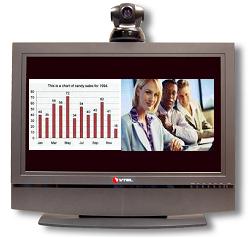
On March 31st 2010 I attended a presentation hosted by Sprint and VTel showcasing a video conferencing system (and Sprint wireless connectivity for the device). The lunch and learn was held at Maggiano’s in Nashville TN.

VTel CEO Richard Ford lead the presentation and was joined by Ken Hall the South East Regional Sales Manager.

They showcased their iPanel Room video conference system. It comprised of an HDTV,  High Def SVideo Camera, a customized slimline PC (that was attached of the rear of the Flat Panel TV) and a paired wireless keyboard. A Sprint wireless device was tethered to the system to provide 3G connectivity. (Sprint mobile 4g is not available in Nashville currently – Sprint 4g is currently limited to WiMAX via their relationship with Clearwire). Read the rest of this entry »


Skype on Android / Verizon = Crippleware

27 03 2010

At long last Skype is available on my Droid!!!! The news on the new app is Good, Bad and Ugly.

Click to enlarge

The Good.

  1. Cheap calls to international destinations directly from your cell phone. This is Huge!
  2. Skype calls do not use any of your wireless plan minutes. Yak all day long if you want to! Especially useful for those long tech support calls to 1-800 numbers during peak hours.
  3. All of your Skype contacts are automatically imported/synced when you sign-in to Skype.
  4. Contact presence is indicated. The online contacts filter to the top of the list, just like with the desktop application.
  5. Call Quality is good.
  6. It’s available at last – Yippee!!!

The Bad Read the rest of this entry »


OpenDNS – Web-filtering for the enterprise. Really ?!?

7 02 2010

I was intrigued when invited to a webinar hosted by OpenDNS regarding their enterprise DNS offerings. I have been an OpenDNS user at my residence since 2006 when their service was first launched.

Traditionally OpenDNS has been targeted at the residential consumer, providing a more secure and  reliable DNS service than the consumers ISP bothered to be. You see, ISP’s make no money from DNS, its a sunken cost for them; so they put as little money into DNS as necessary to keep things running. Corporations pay considerably more for their internet service and have Service Level Agreements in place to ensure they get consistent an reliable service. So the same motivation to switch does not exist at the enterprise level. Additionally internal network infrastructure requires a local DNS service to be managed by the host company anyway, they often don’t need the technical help in managing connections to the public DNS infrastructure.

Read the rest of this entry »


No WiFi? Tether your Droid and use it as a Broadband Modem

30 01 2010

We’ve all been there, you visit a holiday home or a business and no public internet is available. Maybe the Hotel or Airport you’re at want to sell you a full days access just for the few hours you’ll be there.

Tethering computers to your cell phone is one way to overcome this, and with the Droid or another 3G cell phone one can achieve pretty decent data rates. So how is it done?

PDA Net

Click to Enlarge

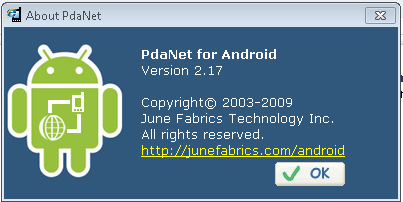
Visit PDA Net and download their PC/Mac client software and install it. It will prompt you to connect your phone using its USB cable or connect via  Bluetooth when it is ready to install the software on your phone. On Android phones such as the Droid, it is necessary to switch the phones USB mode to debugging mode for PDA Net to work. (Debugging mode is accessible via the phones setting menu, Applications, then Development). The advantage of using a USB cable is that the phone will be charged at the same time you are using the internet on your laptop, giving you hours of use.

Read the rest of this entry »


My Top Ten Droid Applications

1 01 2010

This is a list of the applications I have found most useful on the Motorola Droid. I will update this post as I discover apps that are worthy, and demote an item to make room. Some of the apps come on Droid out-of-the-box, others are available on the Android Marketplace. Here’s a quick flavor of what  will describe in more detail.

  • Turn by Turn Navigation.
  • Multi-touch ‘pinch’ zoom just like the iPhone. Plus tabbed browsing!
  • Print web pages and photos from your cell phone directly to your printer(s) from anywhere.
  • Make cheap international calls on your cell, bypassing Verizon’s higher rates.
  • Play Audible eBooks and magazines/newspapers.
  • Have the phone go into silent mode as you arrive at church and go back to normal after you leave.
  • Lose weight.
  • Turn you phone into a radio by playing internet radio on your home or car audio system, or on ear buds as you work out. No DJ’s, No audible adverts. Just music.
  • Have your MP3 collection with you wherever you go, even if it exceeds the memory capacity of the Droid. Take 100GB of search-able MP3’s (or more) on the road!!
  • Sync you iTunes library with the Droid!

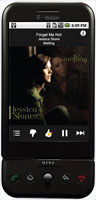
1. Pandora (Free with ads or $34 without ads). Comes with the Droid.

Pandora is a really well written internet radio application. One can select a music stream from a list of genres or type in an artists name and create your own feed of your favorite music. One can’t choose which songs are played, but each Pandora user can give an online thumbs up or thumbs down to a track that is being played which will help Pandora provide music that is well thought of in each genre or for each artist.

The ads are very small at the bottom of the screen, better still there are NO audio ads to interrupt the music, so it is much better than traditional broadcast radio. No DJ to tolerate either. If your phone rings, the audio stream is automatically paused and will resume after the call ends. Attach the audio out jack on the Droid to a stereo or car audio system and the music is CD quality.

I found that it works just as well on Verizon’s 3G network or on WiFi. If the phone switches between WiFi and 3G, say as you drive off from home, it switches seamlessly without skipping!! A click is sometimes heard, but that’s it.

The free version is limited to 40 hours of listening per month. There are also limits on how many tracks one can ‘skip’. These limits are either raised or eliminated if you subscribe to Pandora One. Read the rest of this entry »


I’m ‘this’ close to switching from Firefox to Chrome

14 12 2009

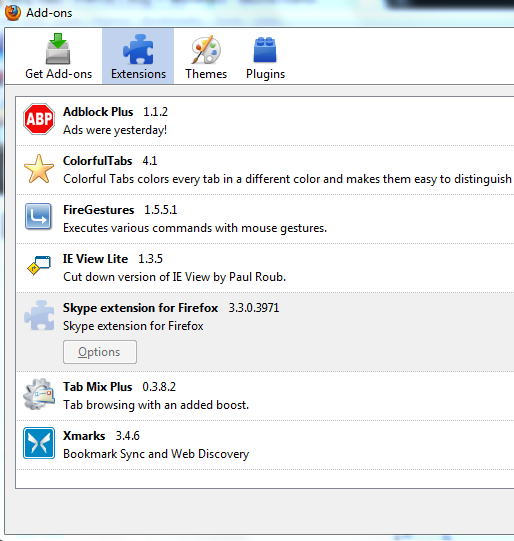
Firefox is a great browesr, the extensions available make life on the internet so much more convenient and productive. I have *never* used Internet Explorer as my primary browser, prior to Firefox I used Netscape and SeaMonkey. When I see others using IE or Firefox without extensions I cringe. All those ads (Yuk!), no easy way to navigate through page history without moving the mouse plus a click or three. Consider having bookmark syncing across browser types /operating systems. Auto tab opening. We get so spoiled so easily.

Click on image to see larger view

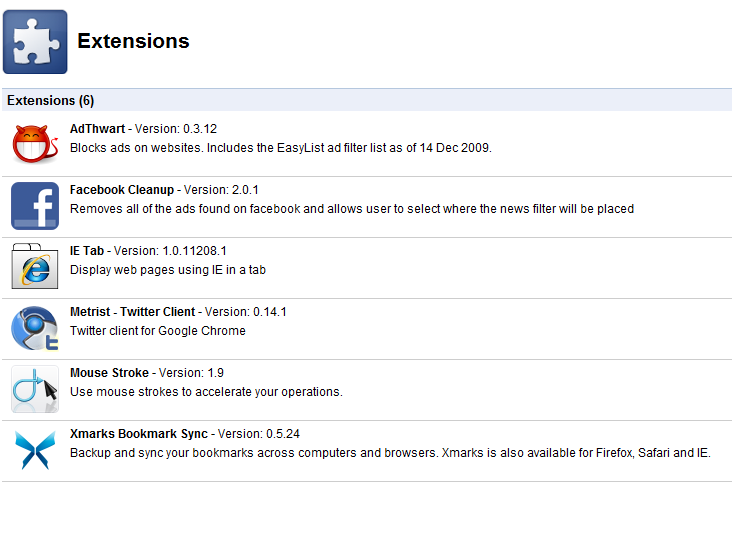
Click on image for larger view.

As great as it is, Firefox is no longer the fastest browser available, it is almost as slow as Internet Explorer IMHO. Google Chrome browser is so much faster, but extensions are not available with Chrome 3 or earlier. Despite the raw speed, the lack of the extra functions I’ve grown accustomed to were missing.Enter Chrome 4.0 Beta with extensions. I checked out the extension capability and lo and behold there are a ton available!! In fact I have found equivalent extensions to my Firefox extensions, minus one I like a lot (Tab Mix Plus). Chrome has some great extensions that are NOT available for Firefox, all the latest extension writing talent appears to have migrated to Chrome. I found a great Twitter client called Metrist, clean easy interface with a count for unread tweets, re-tweet ad replies all in a small package. I also found a Facebook extension called Facebook Cleanup, which allows one to get more space for posts, it changes the page from the default 3 column layout to two column, much neater and more readable!! Oh and Facebook ads are history. I haven’t found a similar cleanup add-on for Firefox.

Chrome is so much faster, both to load initially and render web pages. I can’t find an extension in Chrome that replaces Tab Mix Plus. The feature I love is the automatic opening of tabs when clicking on favorites or URL’s entered into the address bar (once you get used to it, you can’t go back).

Above and to the left are the extensions I use in Firefox 3.5.5, and below to the right those I have installed in Chrome 4 Beta. Once I can find an extension that will open tabs automatically by clicking on favorites or when I manually enter a URL, I’m sold and will most likely switch. The extension ‘action’ appears to be with Google right now.


How Accurate is Google Latitude?

10 12 2009

Google latitude is a service Google offer to its mobile Google Maps customers. Latitude is able to optionally transmit and/or track a cell phones(and hence the owners) location.

It’s accuracy depends directly on how accurate the phones location tracking is. Some phones have fairly accurate GPS systems allowing for turn by turn applications, others are ‘approximations’ based upon triangulation of the adjacent cell phone towers. Nothing surprising or earth shattering here, however I was interested how far off the triangulation location is on the Blackberry 8830.  Even if you have very accurate GPS, how much can you depend on the present location of contacts you share location data with?

If your contacts don’t have accurate GPS on their phones, their location is very approximate. In addition to preciseness of GPS functionality of the phone itself, Google Maps/Latitude drops into low precision mode when you are running it as a background application. See here. So even if you do have great GPS,  results may not be that accurate.

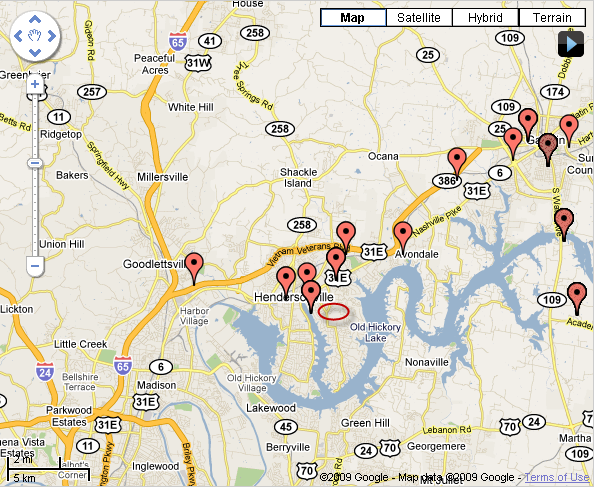
Density of cell towers where you are located appears to have the greatest impact on accuracy if your phone uses triangulation. At home it is accurate within 1/2 mile most of the time. At work near the airport at  Gallatin TN, I found it can be off by as much as 10 Miles!! Latitude History maps are shown below.

Poor accuracy when in low density cell tower zone

Reasonable accuracy with a higher density of cell towers

In the map on the left I was stationary for several hours at a location with a poor signal. The map on the right has a tighter cluster of points close to my home and the route to work, where I had a stronger signal and was closer to more cell towers. Google’s website indicates that it will typically default to the local cell tower location when you run it as  a background application. If that were true I’d expect a  cluster of points at the same spot while I was present at work and not that mobile. Clearly that did not happen.

Latitude will be of more value when all cell phones have true GPS. That day hopefully is not too far away. My next phone from Verizon maybe the Droid, I’d hope it to be more accurate than the 2+ year old Blackberry 8830 I currently have.

Update:2010-01-23 – I got the Droid.

On the Motorola Droid the GPS while Google Maps is running in foreground is wonderfully accurate, and even has the ability for a digital compass pointer. The problem comes when it runs in background, as I described earlier Google Maps drops into low precision mode, so I found my location could be off by several miles. No better than the Blackberry 8830 without GPS. The features on the Droid are superior however. Better map resolution, better traffic data, more map layers. I found the GPS Status App for the droid to be a nice app for troubleshooting GPS issues and it doubles as a compass and altimeter. The droid is accurate to 6 feet according to the GPS Status app.