Resolving outgoing email problems with Yahoo! email Plus on a Droid

12 01 2010

Update 2010-04-01

The new android 2.1 firmware for the droid has resolved all the email issues I was having with my droid on Yahoo email. Deleting messages on the droid really does delete off the yahoo account and vice versa. Reading in one place updates the message read indication on the other. It really works like you’d expect it to. The new update is really worth it for yahoo mail users on a droid. For further information on getting the update now visit here.

Original Article:

Verizon do not support Yahoo email on the Droid. They do on a Blackberry, but not the Droid, and with good reason, it is unreliable.

Outgoing email can easily get stuck in the Droid’s outbox. I found that email could sit there ‘forever’, but switching the phone off and on again would temporarily resolve the problem and mail would be sent. Not wanting to power off the droid every time I sent email from my Yahoo account on the Droid, I looked for another solution.

The solution is to stop using the Yahoo SMTP (Outgoing email) servers and use another service that is compatible with the Droid. Read the rest of this entry »


Transfer Contacts from Blackberry to Droid

31 12 2009

The easiest way to transfer contacts from a blackberry to a Motorola Droid phone is via the GMail contact import feature using a CSV file exported from the Blackberry Desktop Manager. There is one gotcha though; Google does not give you a preview of how the contact data will map, which can have undesirable results!!

Here is the procedure.

  1. Backup your Blackberry data using the BB Desktop Manager.
  2. Export BB contacts to an Excel compatible CSV File. Follow the procedure found here.
  3. Open CSV file in Excel. Read the rest of this entry »


Ubuntu SMART disk analysis is slick!

26 12 2009

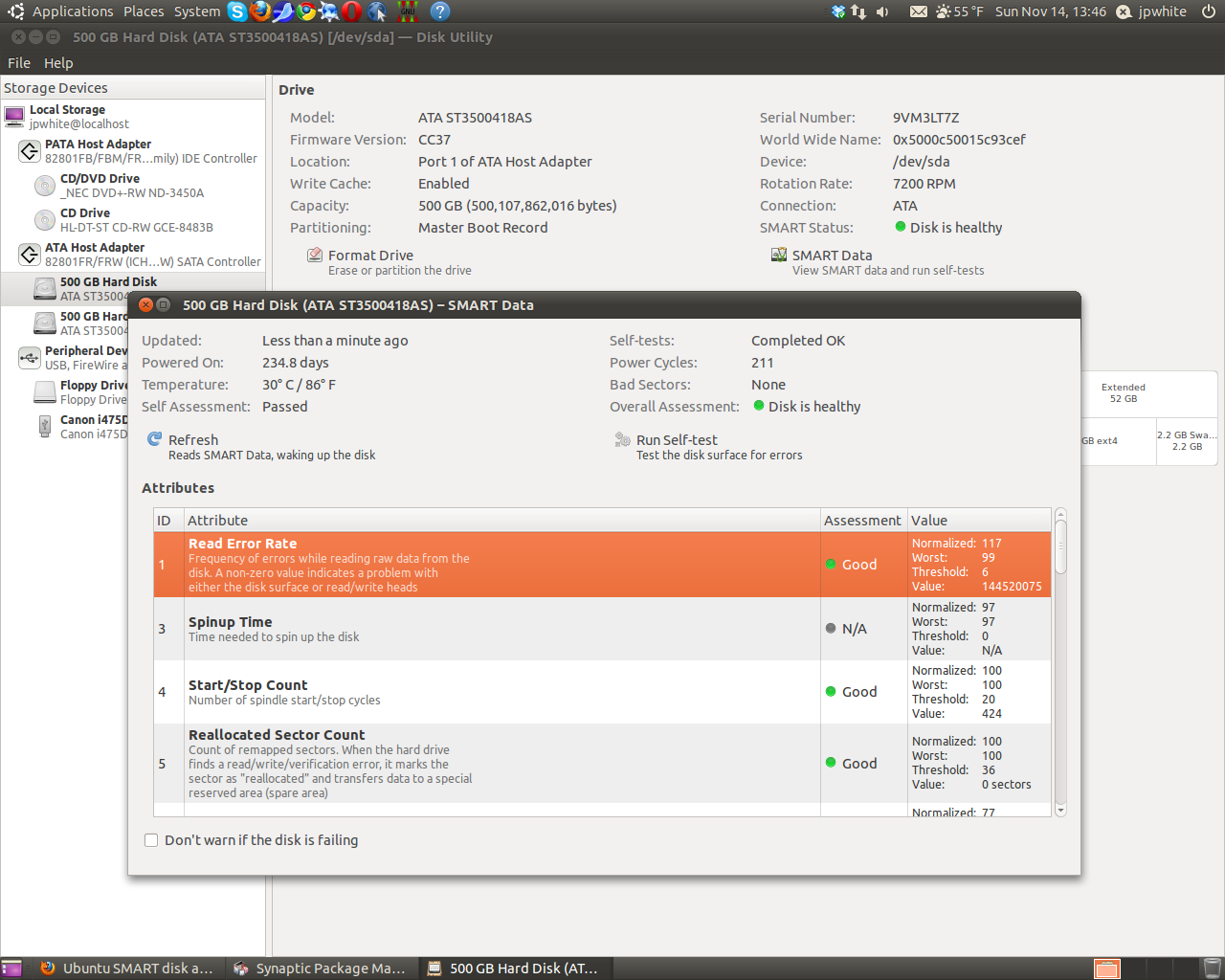
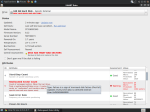
As soon as Ubuntu detects problems with a hard drive that reports S.M.A.R.T. diagnostics it pops up a warning and the depth of information is impressive. Speedfan has a nice enough analysis of hard drive health, but it is a little arcane. The Ubuntu utility really explains what is going on. It also shows historical ‘watermarks’ where a characteristic went over threshold in the past.

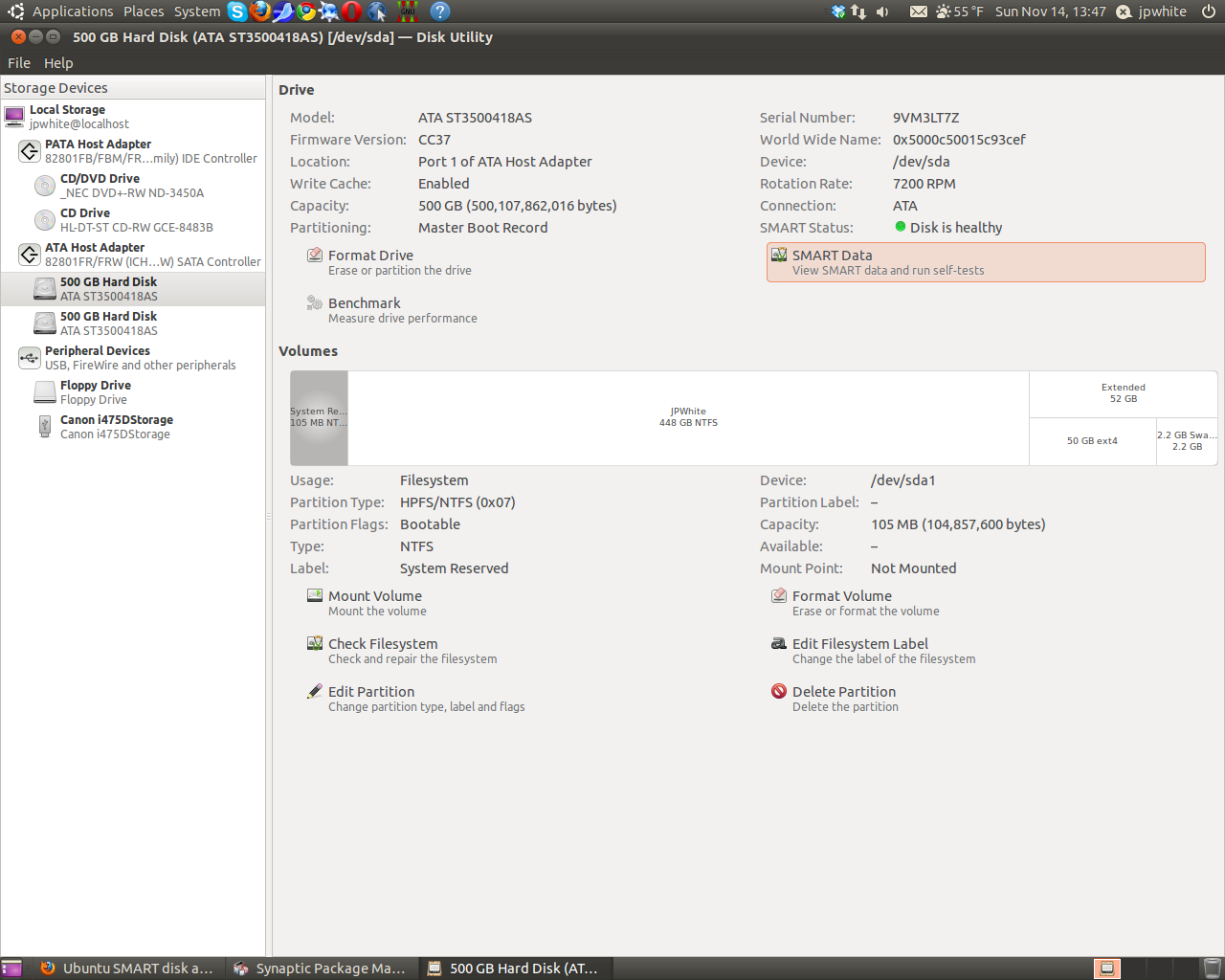
Here are some screen shots of what one can find about a hard drives health status.

Not surprisingly the failing hard drive was replaced and data backed up. Not one piece of user data was lost, as is often the case with failing hard drives, files affected are mostly system/program files. Recovery of data is typically very successful. In this case the user had only 700MB of data on a 500GB drive.

To look at the SMART characteristics of drives attached to an Ubuntu system start the Disk Utility which is located under
System -> Administration -> Disk Utility. This disk utility is a Gnome desktop tool, for those with other variants of linux or Ubuntu with different desktops it can be added to your distribution by installing the application gnome-disk-utility using synaptic package manager or the command line

sudo apt-get install gnome-disk-utility

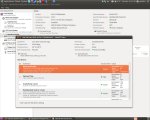
Update 2010-11-14: Since the introduction of Ubuntu 10.4 the disk utility included in Ubuntu has changed. Screen shots of the new disk utility are included below. The utility provides more information, especially about how the disk partitions are organized. However I have found that once in a while the new utility reports that SMART disk statistics are unavailable for a disk, using Ubuntu 9.10 Live Disk reveals that the SMART statistics are available after all. This is an unfortunate problem with what is a great diagnostic tool, hopefully the drive compatibility will be improved back to its former glory.

Click to enlarge image

Click to enlarge image


To read more about Ubuntu visit


Wordpad on Windows 7 reads docx files!!

22 12 2009

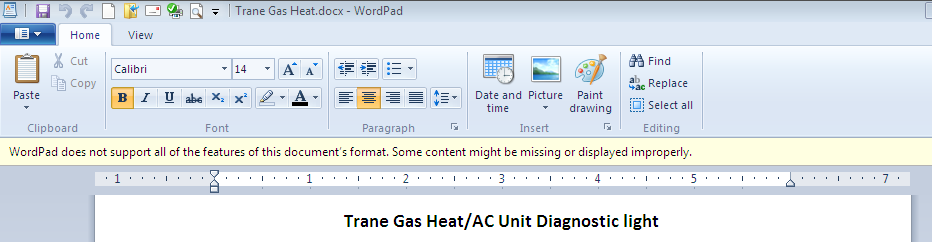
If you were needing another reason to switch to Windows 7, here is another. Wordpad on Windows 7 *can* read and modify MS Word 2007/2010 docx files.

Click on image to enlarge

I found this out when using my Netbook that does not have Office installed (frankly it’s not capable of running Office). I opened a docx file without thinking and saw a warning that all document features may not be supported. On the screen I notice that the top margin was absent, but when I printed the document it came out looking great. Wordpad does use a ribbon interface and appears to support the basic features one would expect from a word processor.

If you are using a budget computer or are operating on a small budget then Wordpad can work as your wordprocesor. It is the poor man’s word processor!!


Laptop running slow? Check temperature with Speedfan!

19 12 2009

Computers typically run just fine when you first get them but then slowly degrade. Even after loading Windows 7 as a clean install I was still experiencing a slower laptop than I remembered when I purchased it 2 years ago. Windows startup/login time was just too slow.

Click on image to enlarge

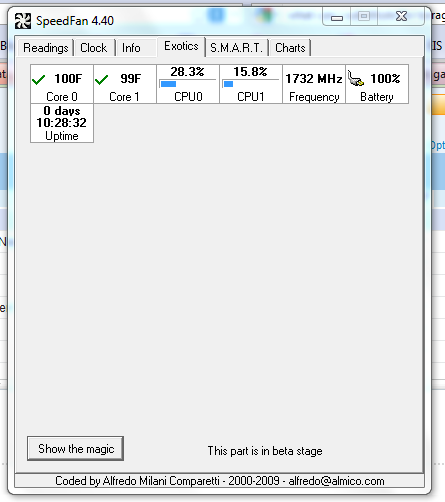
Using Speedfan (download here) I noticed the laptop was running a little hot, about 140°F and the cooling fan was operating all of the time. Speedfan also measures the actual CPU speed and my dual core cpu’s were running at only 900Mhz. The Intel T2080 Dual-Core CPU installed in the laptop is rated at 1.73 Mhz, so I was losing almost 50% of the rated speed.  This additional CPU information is on the new ‘exotics’ tab of Speedfan (see graphic). I replaced the cooling fan with a brand new one I got off eBay for $20 and the laptop is running at full speed now!! (Speedfan CPU numbers are not dynamic like the temperature and other numbers, the speed reported is at the time Speedfan was started. To get a good sample exit and restart Speedfan several times).

Read the rest of this entry »


Fixing a failed update to Firefox in Ubuntu

19 12 2009

The problem

I did a routine update to one of my Ubuntu installations this morning, and lo and behold it failed during the Firefox update. Even after a cold reboot I was unable to start Firefox, it was broken.

Not able to browse the internet from Ubuntu to research the problem and never having had a problem like this before I was left with a conundrum. The update manager didn’t show Firefox as needing an update anymore. Eventually I stumbled on the fix, here it is.

The Fix

Launch Synaptic package manager and type in Firefox in the Quick search box. Find Firefox which should have a green check-box indicating it is installed. Right click the green Read the rest of this entry »


Best driver for Canon i475D on Ubuntu 9.10

18 12 2009

Ubuntu does not have a driver for the Canon i475D printer. I experimented with several and found that the ‘i450D foomatic/bjc800’ driver provided the best test page.

Some web resources (like this) suggest using the BJC800 driver, however I found it printed the test page very small on the page. I notice the i450 driver mentions the bjc800. Be sure to chose the i450/bjc800 and NOT the bjc800 only and the prints will be just fine.


Office 2010 Installation Woes

4 12 2009

My first two installations of Office 2010 went very smoothly, however the third was definitely not a  charm. During the installation I ran into two errors.

Error 1310. Error writing to file: C:\Windows\Installer\21c0d0.msi.    Verify that you have access to that directory.’

Error 1935. An error occurred during the installation of assembly component {4FB1241B-9730-4DF1-B83B-1E9CFB73AAE4}. HRESULT: 0x80070005.

The second error caused the installation to fail and abort. Even running the install as administrator did not result in success, though the first error was resolved by doing so. Each time I ran the install it would fail at a different place in the install.

Eventually after rebooting many times and disabling various applications such as Carbonite and retrying it finally succeeded. I subsequently found some blogs complaining about similar problems during install of the 2010 office beta. The applications that seem to come up on the blogs are Panda AV and Microsoft Security Essentials. I do run Security essentials on all the three computers I installed Office 2010 on, so the problem would appear to be somewhat random, but I suspect security essentials contributed to the problems.

My advice to those installing office 2010 is disable security essentials (and other applications) and be sure to run the installer as administrator.

Update 2010-05-01

The final version of Office 2010 also suffers from touchy installation problems. The best course of action for office 2010 installs is to

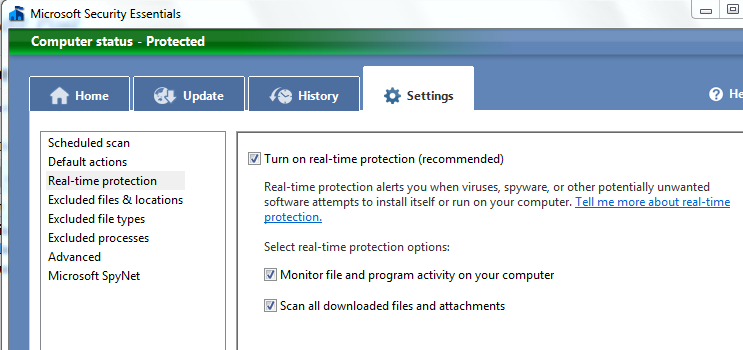
  • Disable Real-time scanning in Microsoft Security Essentials. (See below)
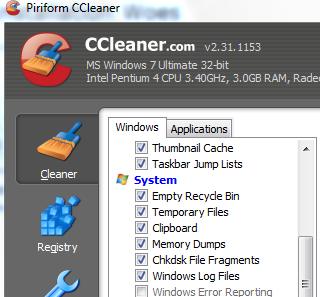
  • Clear up any temporary files using CCleaner. (See below)
  • Pause Carbonite
  • Run the install program as administrator.

Be sure to uncheck the real-time scanning in Security Essentials

Use CCleaner to eradicate all temp files on your system

If you had installed 2010 Beta, be sure to unistall all office products prior to install.

Upgrading from 2007 can also be problomatic, best to do a complete uninstall first.


Clean Install of Windows 7 using upgrade media

2 11 2009

I purchased a Windows 7 Professional upgrade. I have a legitimate copy of Vista Ultimate so am legally OK with buying the upgrade. What I wanted to do however was install the Windows 7 upgrade onto a new hard drive I just purchased for the same laptop and not do an in place upgrade.

The install went great (did a custom install) until it came to the product key. It would NOT accept the product key that came in the package. The Error code was 0xC004F061, License not for clean installations. I did overcome this issue by speaking to Microsoft for over an hour on the phone. The guy at MS I spoke with was from Bangalore India, and he spoke jolly good English!!

Here is the full procedure from an empty hard drive to activated Win7.

1. Install using custom option to partition and install windows 7 as you see fit.
2. At the product key prompt do not enter anything and un-check the auto activate check box.
3. Windows 7 now operates great, except it is not activated. You have 30 days.
4. Run regedit and visit the following key
HKEY_LOCAL_MACHINE\SOFTWARE\Microsoft\Windows\CurrentVersion\Setup\OOBE
and change the value of MediaBootInstall from one to zero.

Update 2009:12-02 Follow the registry mod with the following at a command prompt
slmgr /rearm

The product should activate now. If not continue with step 5 below.

5. Put the Windows 7 upgrade DVD in the drive and perform another Windows 7 installation. (You may have to reboot prior to the install starting successfully).
6. Be sure to not update the install automatically and be very sure to select ‘Upgrade‘.
7. After the install finishes enter the product key. It should be accepted and you can activate from windows once it logs in again.

Prior to calling Microsoft I tried everything from having the original Vista install CD in the drive during activation, to attaching my old HD via an external HD enclosure. The activation process does not recognize the old Vista either as install CD or the old installed version.

Making a drive image now that it is activated using Acronis True Image is the way to avoid this again should something go awry with my HD or OS.

Update 2009-11-20:  For more options for performing a clean install using upgrade media, visit Paul Thurrrott’s supersite for windows. It appears that the Microsoft support technician left out an important step during the registry hack which necessitated the double install. The second install could have been avoided.


Gmail outage – take action now – be ready for next time.

1 09 2009

Gmail’s outage today teaches us all a lesson about how our emails can vanish in a blink of an eye. There is plenty we can do to ward off a total blackout next time, and there will be a next time.

Background

In the ‘good ‘ole days’ we all used email clients installed on our computers, and typically used pop access to our ISP’s email. However if we found ourselves away from our main computer, then we could not easily see emails we had received previously even if we had webmail access, the client was typically configured to delete off the server messages already retrieved.

The wide adoption of web based email solved the needs of the mobile computer user. Web based email (an example of ‘cloud computng’) is great until something goes wrong with ‘The Cloud’. We’ve traded one problem for another. There is a solution however!!

The Fix, IMAP.

Use an email client on all your computers (such as Thunderbird) to download and read your Google mail using the IMAP email protocol. The big advantage of IMAP over the once popular POP protocol is that emails are preserved on the web at all times. In addition, synchronization occurs to ensure that copies of all sent and received emails are kept on both the web and the computer email client no matter which one was used last to send or receive. With an IMAP client, when Gmail fails again, at least you will have access to your old emails and can compose new emails ready to be sent once GMail comes back up. The emails are also available offline for reading and replies if you are in the air or disconnected for any reason.

Thunderbird 3 beta 3 is especially useful for IMAP, it has an IMAP wizard which is GMail aware to help you set it up easily. Setting up access to IMAP can be tricky, Thunderbird simplifies that process, and optimizes the settings for best performance. You do have to enable IMAP on your GMail account, instructions for enabling can be found here. After you have enabled IMAP the ‘configure your IMAP client’ link may look way too complicated to follow, but that’s where the Thunderbird IMAP wizard comes to the rescue. Thunderbird runs an Windows, Mac and Linux, so there are very few computers that cannot take advantage of this tool.

Give it a go, nothing ventured, nothing gained. Details on the features of Thunderbird and runing the email wizard can be found here. Next time you will have access to all your historical emails, and be able to compose new ones, while everyone else is reduced to fussing on twitter about their ordeal. Just remember to sync your email client at least daily, or use it as your primary email reader/composer.