Netbook Use Case #42 – Green Cooking

24 12 2009

No trees were killed in the cooking of this Pecan Pie!!

Click on image to Enlarge

No need to print out a recipe, just walk the netbook into the kitchen and start cooking. Netbooks don’t take up half of your contertop like large cook books do either!!


Wordpad on Windows 7 reads docx files!!

22 12 2009

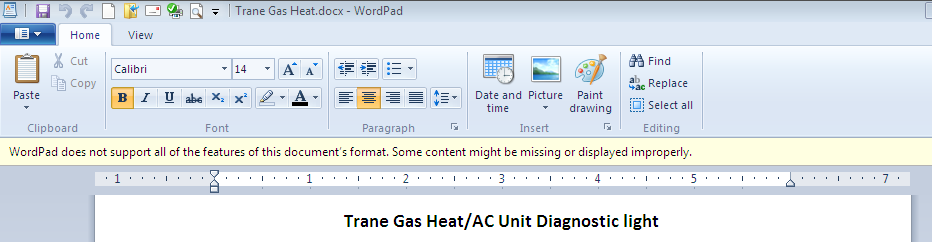
If you were needing another reason to switch to Windows 7, here is another. Wordpad on Windows 7 *can* read and modify MS Word 2007/2010 docx files.

Click on image to enlarge

I found this out when using my Netbook that does not have Office installed (frankly it’s not capable of running Office). I opened a docx file without thinking and saw a warning that all document features may not be supported. On the screen I notice that the top margin was absent, but when I printed the document it came out looking great. Wordpad does use a ribbon interface and appears to support the basic features one would expect from a word processor.

If you are using a budget computer or are operating on a small budget then Wordpad can work as your wordprocesor. It is the poor man’s word processor!!


Laptop running slow? Check temperature with Speedfan!

19 12 2009

Computers typically run just fine when you first get them but then slowly degrade. Even after loading Windows 7 as a clean install I was still experiencing a slower laptop than I remembered when I purchased it 2 years ago. Windows startup/login time was just too slow.

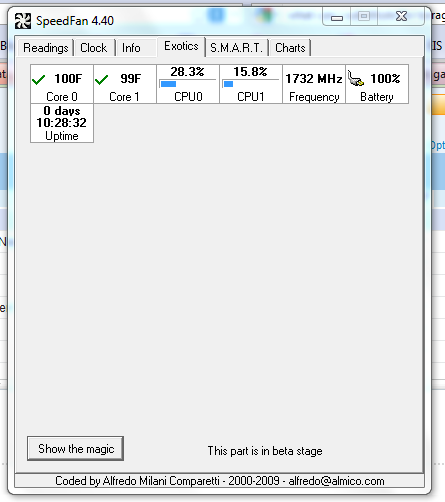
Click on image to enlarge

Using Speedfan (download here) I noticed the laptop was running a little hot, about 140°F and the cooling fan was operating all of the time. Speedfan also measures the actual CPU speed and my dual core cpu’s were running at only 900Mhz. The Intel T2080 Dual-Core CPU installed in the laptop is rated at 1.73 Mhz, so I was losing almost 50% of the rated speed.  This additional CPU information is on the new ‘exotics’ tab of Speedfan (see graphic). I replaced the cooling fan with a brand new one I got off eBay for $20 and the laptop is running at full speed now!! (Speedfan CPU numbers are not dynamic like the temperature and other numbers, the speed reported is at the time Speedfan was started. To get a good sample exit and restart Speedfan several times).

Read the rest of this entry »


Fixing a failed update to Firefox in Ubuntu

19 12 2009

The problem

I did a routine update to one of my Ubuntu installations this morning, and lo and behold it failed during the Firefox update. Even after a cold reboot I was unable to start Firefox, it was broken.

Not able to browse the internet from Ubuntu to research the problem and never having had a problem like this before I was left with a conundrum. The update manager didn’t show Firefox as needing an update anymore. Eventually I stumbled on the fix, here it is.

The Fix

Launch Synaptic package manager and type in Firefox in the Quick search box. Find Firefox which should have a green check-box indicating it is installed. Right click the green Read the rest of this entry »


Best driver for Canon i475D on Ubuntu 9.10

18 12 2009

Ubuntu does not have a driver for the Canon i475D printer. I experimented with several and found that the ‘i450D foomatic/bjc800’ driver provided the best test page.

Some web resources (like this) suggest using the BJC800 driver, however I found it printed the test page very small on the page. I notice the i450 driver mentions the bjc800. Be sure to chose the i450/bjc800 and NOT the bjc800 only and the prints will be just fine.


Will litigation neuter the internet?

16 12 2009

A free internet is under threat on several fronts, several proposed laws may severely limit the internet and cripple innovation. Large corporations and organizations would like to control the internet and they may well do so if the following laws come to pass.

ACTA (Anti-Counterfeiting Trade Agreement).

Anti-counterfeiting, who could be against that? This proposed treaty may get international ratification, we could have our freedoms encroached without a US law ever having to be passed! See this webpage.

Three strikes is at the core of this agreement. If an internet user is accused three times (note not convicted, just accused by anyone reporting them to their ISP), then the internet user gets booted off the internet by their ISP. No due process, no appeal process. Guilt is assumed not proven. In France they have already passed similar legislation. Bans for life could be dished out, even the infamous hacker Kevin Mitnick got his internet privileges back. You and I may not.

Some of the organizations supporting this treaty are Read the rest of this entry »


I’m ‘this’ close to switching from Firefox to Chrome

14 12 2009

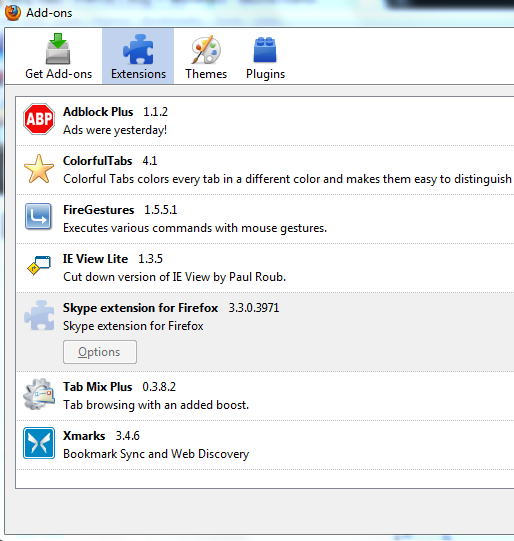
Firefox is a great browesr, the extensions available make life on the internet so much more convenient and productive. I have *never* used Internet Explorer as my primary browser, prior to Firefox I used Netscape and SeaMonkey. When I see others using IE or Firefox without extensions I cringe. All those ads (Yuk!), no easy way to navigate through page history without moving the mouse plus a click or three. Consider having bookmark syncing across browser types /operating systems. Auto tab opening. We get so spoiled so easily.

Click on image to see larger view

Click on image for larger view.

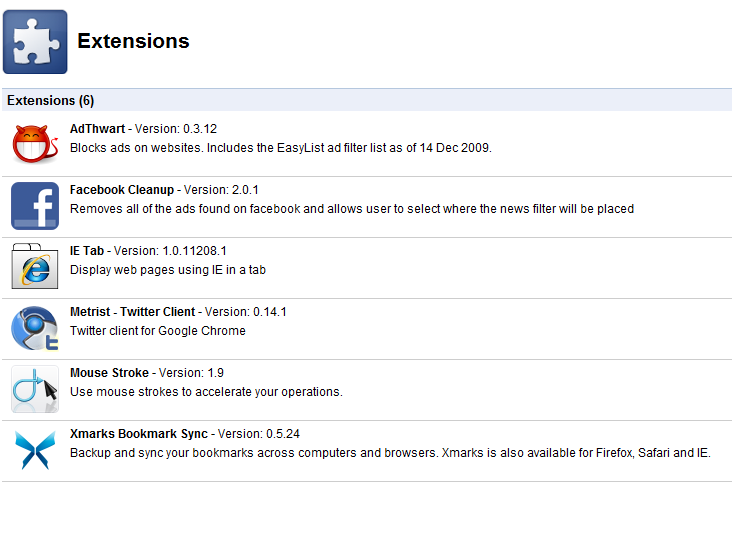
As great as it is, Firefox is no longer the fastest browser available, it is almost as slow as Internet Explorer IMHO. Google Chrome browser is so much faster, but extensions are not available with Chrome 3 or earlier. Despite the raw speed, the lack of the extra functions I’ve grown accustomed to were missing.Enter Chrome 4.0 Beta with extensions. I checked out the extension capability and lo and behold there are a ton available!! In fact I have found equivalent extensions to my Firefox extensions, minus one I like a lot (Tab Mix Plus). Chrome has some great extensions that are NOT available for Firefox, all the latest extension writing talent appears to have migrated to Chrome. I found a great Twitter client called Metrist, clean easy interface with a count for unread tweets, re-tweet ad replies all in a small package. I also found a Facebook extension called Facebook Cleanup, which allows one to get more space for posts, it changes the page from the default 3 column layout to two column, much neater and more readable!! Oh and Facebook ads are history. I haven’t found a similar cleanup add-on for Firefox.

Chrome is so much faster, both to load initially and render web pages. I can’t find an extension in Chrome that replaces Tab Mix Plus. The feature I love is the automatic opening of tabs when clicking on favorites or URL’s entered into the address bar (once you get used to it, you can’t go back).

Above and to the left are the extensions I use in Firefox 3.5.5, and below to the right those I have installed in Chrome 4 Beta. Once I can find an extension that will open tabs automatically by clicking on favorites or when I manually enter a URL, I’m sold and will most likely switch. The extension ‘action’ appears to be with Google right now.


How Accurate is Google Latitude?

10 12 2009

Google latitude is a service Google offer to its mobile Google Maps customers. Latitude is able to optionally transmit and/or track a cell phones(and hence the owners) location.

It’s accuracy depends directly on how accurate the phones location tracking is. Some phones have fairly accurate GPS systems allowing for turn by turn applications, others are ‘approximations’ based upon triangulation of the adjacent cell phone towers. Nothing surprising or earth shattering here, however I was interested how far off the triangulation location is on the Blackberry 8830.  Even if you have very accurate GPS, how much can you depend on the present location of contacts you share location data with?

If your contacts don’t have accurate GPS on their phones, their location is very approximate. In addition to preciseness of GPS functionality of the phone itself, Google Maps/Latitude drops into low precision mode when you are running it as a background application. See here. So even if you do have great GPS,  results may not be that accurate.

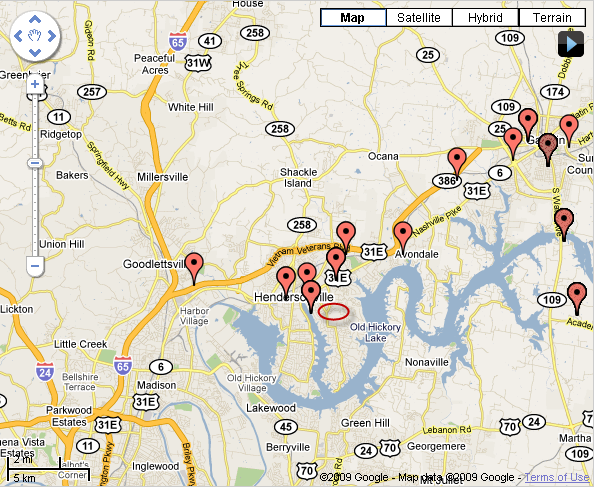
Density of cell towers where you are located appears to have the greatest impact on accuracy if your phone uses triangulation. At home it is accurate within 1/2 mile most of the time. At work near the airport at  Gallatin TN, I found it can be off by as much as 10 Miles!! Latitude History maps are shown below.

Poor accuracy when in low density cell tower zone

Reasonable accuracy with a higher density of cell towers

In the map on the left I was stationary for several hours at a location with a poor signal. The map on the right has a tighter cluster of points close to my home and the route to work, where I had a stronger signal and was closer to more cell towers. Google’s website indicates that it will typically default to the local cell tower location when you run it as  a background application. If that were true I’d expect a  cluster of points at the same spot while I was present at work and not that mobile. Clearly that did not happen.

Latitude will be of more value when all cell phones have true GPS. That day hopefully is not too far away. My next phone from Verizon maybe the Droid, I’d hope it to be more accurate than the 2+ year old Blackberry 8830 I currently have.

Update:2010-01-23 – I got the Droid.

On the Motorola Droid the GPS while Google Maps is running in foreground is wonderfully accurate, and even has the ability for a digital compass pointer. The problem comes when it runs in background, as I described earlier Google Maps drops into low precision mode, so I found my location could be off by several miles. No better than the Blackberry 8830 without GPS. The features on the Droid are superior however. Better map resolution, better traffic data, more map layers. I found the GPS Status App for the droid to be a nice app for troubleshooting GPS issues and it doubles as a compass and altimeter. The droid is accurate to 6 feet according to the GPS Status app.


SharePoint 2010 – Microsoft Presentation, Nashville TN.

9 12 2009

I attended the SharePoint Users Group meeting at Microsoft’s Nashville offices on December 8th 2009. Microsoft presented and sponsored the event. The Pizza was really good :-) The presentation was to introduce SharePoint 2010 to the user community highlighting new and improved features.

Microsoft could have spent more time in preparation and planning, there were delays due to technical glitches and the speaker did not cover all the subject areas he would like to have.

Here is what I learned.

Platform

SharePoint is exclusively a 64-bit application. It only runs on Server 2008 R2 and only supports SQL or SQL Express for content storage. The Windows Internal Database no longer exists, which is a good move. However it will pose an extra challenge for those upgrading from 2007/3 to 2010 if their data is in an internal database store. SharePoint can access  SQL ‘Remote Blob’ objects.

WSS has been renamed to WSF (Windows SharePoint Foundations). Foundations is the base SharePoint functionality included with Server 2008.

Search has been enhanced, phonetic ‘sounds-like’ matches are now returned.

SharePoint Designer 2010 is only compatible with SharePoint 2010, likewise Visual Studio 2010 only works with SharePoint 2010. Microsoft decided to sacrifice backwards compatibility to enable them to add a lot more features to the latest version of SharePoint.

Migration tools are available only for Moss 2007 servers. 2003 and previous versions will not be migrated directly from 2010 server administration.

New Licensing Options

In previous versions of SharePoint, making sites outward facing was an expensive proposition, requiring an expensive license. Two licenses are now offered for external facing sites. A lower cost license is available for sites that do not utilize enterprise features, for instance a publishing site. A higher cost enterprise feature set version is still available.

Better Browser Support

SharePoint 2010 support what Microsoft refer to as ‘Tier 1 Browsers’. This is Internet Explorer, Firefox and Safari. As an exclusive Firefox user this is especially welcome. I won’t need the IE Tab extension to Firefox anymore to work on SharePoint sites.

New Interface

Microsoft have adopted the ribbon in all office products including SharePoint 2010. (Interestingly the SharePoint product no longer has ‘Office’ in its official product name). The Ribbon is not always visible, they have chosen to reuse the space where the ribbon has less value, it is present for any operation that involves editing content or page configuration.

The Ribbon can be disabled/hidden for some or all users and sites. One reason Microsoft did this is to allow a company to upgrade their SharePoint server to 2010 but keep the 2007 look and feel allowing for training and adoption of the new interface in a gradual manner.

SharePoint designer is integrated as an option on the ribbon, no need to launch a separate application from the host desktop. SharePoint Designer has undergone major revision and its performance has been greatly increased.

Better Integration

Integration to Office 2010 products and the desktop has been improved. Colors, logos and fonts established as a master page in PowerPoint can be saved as a theme file (.thmx extension) and imported into SharePoint to provide the same look and feel on a  SharePoint site. This makes it much easier to create branded themes allowing users to create their own without involvement from IT.

A feature has been added to allow a user to make a local copy of a SharePoint site including all of its content. This can then be accessed offline and changes synchronized when back online. (It’s similar to Collegio Networks Collegio Reader). This sounds like a very useful feature for those that travel a lot, however when quizzed about security of data should a laptop be lost/stolen no specific solution was offered (except a vague mention of Group Policy). I suppose Bitlocker would be one way to protect the data, it would be nice for DRM and security features to be available with offline access.

SharePoint can now host office applications allowing for the creation/editing of office documents from inside a browser window. The functionality and look of the web based office apps is very close to the desktop products. A few features such as word art aren’t supported in the hosted mode. As long as licensing is addressed, it is now possible to offer full office functionality to computers that do not have any version of office installed locally. This is known as Office Web Applications (OWA). Oh boy, I thought OWA stood for Outlook Web Access, I suspect that Outlook will be rolled into the new Office Web Apps, it is an office application after all.

Content Editing

The new interface allows for formatting and editing of text and objects directly from the Ribbon, negating the need for a separate Rich Text web part. Any page on a SharePoint site can be modified as rich text. Several features demonstrated drew me to the conclusion that web parts as separate zones are being de-emphasized and reserved for specific purposes. Editing content is much more like using Word.

A new feature called ‘Notepad’ allows content contributors to add a separate set of comments attached to each page allowing for an ongoing dialog regarding the editing of the associated page content. This is very much like the ‘talk’ feature on Wikipedia.

Content types can be mized on the same page, for instance in a team site for example WIKI content can be created in-line simply by creating a link [[Link]] with double square parentheses and clicking on the new link to edit the wiki content. Wiki and non-wiki content can be interwoven on the same page.

Multiple users can edit the same document ina document library. Purportedly at the same time though this was not demonstrated.

Multimedia Support enhanced

Silverlight is suported directly in SharePoint. Inserting video and photo content into a  page is very straight forward using basic ribbon tools. No need to install special modules on the server and perform arcane web part manipulation to support video streaming. An end user can easily handle multi-media without IT intervention. While the adding and editing of multi-media content has undergone much needed improvement. Little improvement was evident in the consumption of multi-media content, such as photo galleries, or a jukebox for audio etc. Shame, that would have rounded it off nicely.

Better Dash-boarding / Business Intelligence.

Performance Point Server has been built directly into the SharePoint solution and is now called SharePoint Insights. SahrePoint can now therefore consolidate and analyze data in addition to simply presenting it.

Enhanced Personal Pages

Personal pages are laid out more logically. Organizational hierarchy documented in Active Directory is graphical represented in the Personal pages. I wish I had screen shots, the drill down approach to the organization hierarchy was very creative and intuitive. Microsoft have made a bigger emphasis on the community building capabilities  of SharePoint.

Improved Administration

The Central Administration pages have undergone usability testing and are much easier to navigate and are organized in a more logical manner. The concept of SSP’s has been removed from the architecture.

Microsoft Releases short Office 2010 videos

6 12 2009

Microsoft have released some short videos showing the latest features in Office 2010.

They could have used professional presenters for a better result, but the message is the same.